Hours: Sun - Thu: 10.00 AM - 7.00 PM

Tackling the Changes of Retail Industry

Choose Your Defensive Mode

Depending on your comfort level, you can decide how the WAF reacts when it spots trouble:
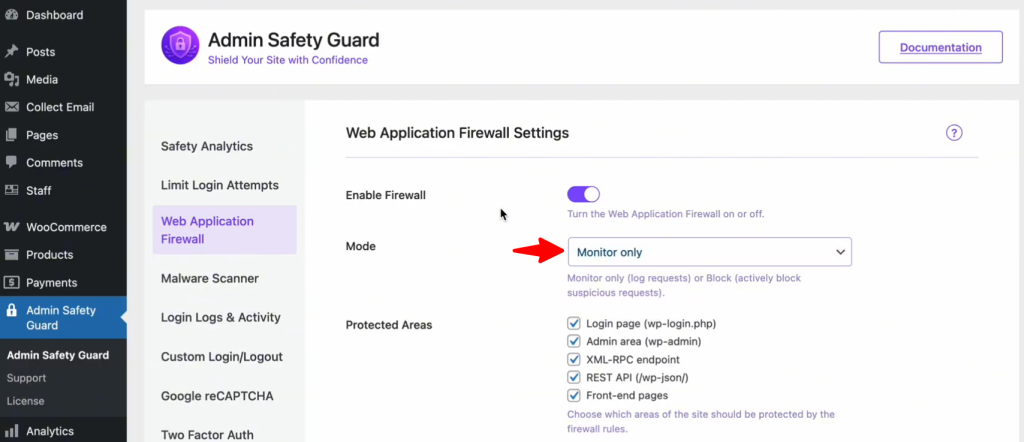
  • Monitor Only: This is perfect for a “learning phase.” The WAF will watch for threats and log them, but it won’t block anyone. Use this if you want to ensure no legitimate traffic is accidentally caught.
  • Block & Log (Recommended): This is the “active duty” mode. If the system detects a malicious pattern, it blocks the IP address immediately and logs the event for your review. This provides the highest level of real-time security.

Secure Your High-Value Targets

Not all pages on your site are equal. Hackers focus on specific “doors” to gain entry. In your WAF settings, ensure you have enabled protection for these critical areas:
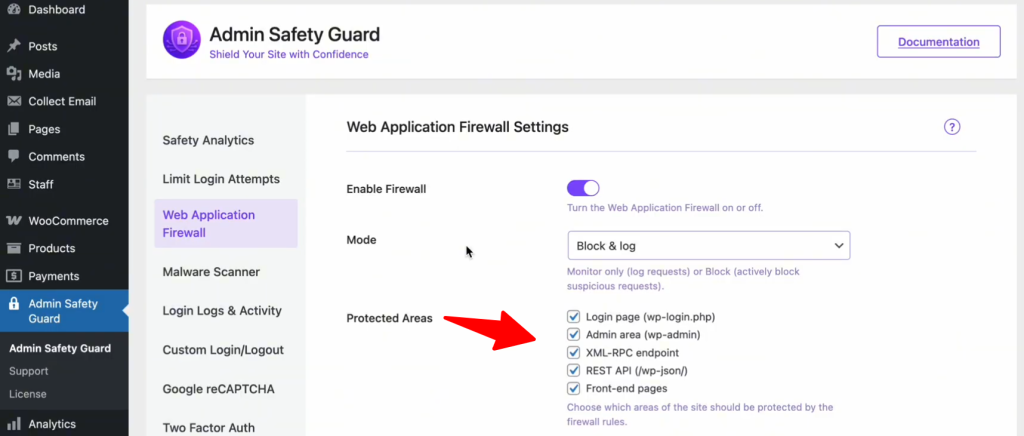
  • Login Page (wp-login.php): Stops brute-force bots from guessing your password.
  • Admin Area (wp-admin): Prevents unauthorized users from escalating their privileges.
  • XML-RPC & REST API: These are often exploited by automated scripts to inject data or steal information. Closing these unless necessary is a security best practice in 2026.